Monday, November 30, 2009
Reinstall windows without losing anything
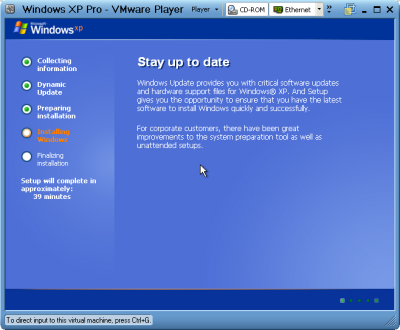
This is better than doing a windows repair install from the cd because doing that can cause changes to settings and even make it so you can't get updates anymore from Microsoft update site because of the 'silent install' they did a year or so ago (unless you rereg some dll files).
1- Start Windows XP
2- Go to the location of your source files
3- Run WINNT32 /unattend
For example, D:\I386\winnt32 /unattend ( copy & paste this command into the RUN box, then press ENTER ) Your computer will do the rest.
Start > All Programs > Accessories > Command Prompt.
Copy & paste > D:\I386\winnt32 /unattend (notice the space between 32 and / )
Press Enter.
If you have i386 on your drive, you can replace D: ( if D: is your cd drive ) with the location of it. (be sure it's the full i386 though)
D: is the driver letter where your windows XP Cd is
if D:\I386\winnt32 /unattend doesn't work then try : d:\winnt32 /unattend.
You can use this method as often as you like when you need to repair something that had gotten corrupted and you don't want to do a clean install.
This is better than doing a windows repair install from the cd because doing that can cause changes to settings and even make it so you can't get updates anymore from microsoft update site because of the 'silent install' they did a year or so ago (unless you rereg some dll files).
1- Start Windows XP
2- Go to the location of your source files
3- Run WINNT32 /unattend
For example, D:\I386\winnt32 /unattend ( copy & paste this command into the RUN box, then press ENTER ) Your computer will do the rest.
Start > All Programs > Accessories > Command Prompt.
Copy & paste > D:\I386\winnt32 /unattend (notice the space between 32 and / )
Press Enter.
If you have i386 on your drive, you can replace D: ( if D: is your cd drive ) with the location of it. (be sure it's the full i386 though)
D: is the driver letter where your windows XP Cd is
if D:\I386\winnt32 /unattend doesn't work then try : d:\winnt32 /unattend.


Make Firefox 30 Times Faster

1. Type "about:config" into the address bar and hit return. Scroll
down and look for the following entries:
network.http.pipelining
network.http.proxy.pipelining
network.http.pipelining.maxrequests
Normally the browser will make one request to a web page at a time.
When you enable pipelining it will make several at once, which really
speeds up page loading.
2. Alter the entries as follows:
Set "network.http.pipelining" to "true"
Set "network.http.proxy.pipelining" to "true"
Set "network.http.pipelining.maxrequests" to some number like 30. This
means it will make 30 requests at once.
3. Lastly right-click anywhere and select New-> Integer.
Name it "nglayout.initialpaint.delay" and set its value to "0".
This value is the amount of time the browser waits before it acts on information it
recieves.
If you're using a broadband connection you'll load pages 2-30 times faster now.
down and look for the following entries:
network.http.pipelining
network.http.proxy.pipelining
network.http.pipelining.maxrequests
Normally the browser will make one request to a web page at a time.
When you enable pipelining it will make several at once, which really
speeds up page loading.
2. Alter the entries as follows:
Set "network.http.pipelining" to "true"
Set "network.http.proxy.pipelining" to "true"
Set "network.http.pipelining.maxrequests" to some number like 30. This
means it will make 30 requests at once.
3. Lastly right-click anywhere and select New-> Integer.
Name it "nglayout.initialpaint.delay" and set its value to "0".
This value is the amount of time the browser waits before it acts on information it
recieves.
If you're using a broadband connection you'll load pages 2-30 times faster now.
Set Multiple Home Pages In Firefox
Suppose you would like to set Orkut, Google and my blog as your homepages. Then try this tweak in Firefox to set multiple homepages. This is what you should do :
Goto Tools>Options>Main
In the When Firefox starts drop down menu choose Show my home page
In Home page give your homepages separated by a | (pipe symbol)

Example:
Goto Tools>Options>Main
In the When Firefox starts drop down menu choose Show my home page
In Home page give your homepages separated by a | (pipe symbol)

Example:
Shutdown Computer/Laptop with a Cell Phone
 Using this method, a user can shutdown, restart, hibernate, etc. his or her computer, just by sending an email from his or her phone.
To do this, all you will need is Microsoft Outlook which should come with Microsoft Office, which most people have. This will need to be on the computer wish you wish to shutdown.
So, this is how you do this:
1. First, you need the batch files to perform the Shutdown, Hibernate etc. You can write them down yourselves
2. open your note pad and write like this...
c:\windows\system32\shutdown -s -f -t 00
and save it as shutdown.bat
3. Open up Microsoft Outlook. Make sure that you have already configured it for your email.Now we will need to make it so that Outlook checks your inbox about every minute (1 minute for testing time can be increased if a delayed shutdown is desired). You can do this by going to Tools: Options.
4. Then click the Mail Setup tab, and afterwards, the Send/Receive button.
5. Make sure that the Schedule an automatic send/receive every... box is checked, and set the number of minutes to 1. Now you may close all of these dialog boxes.
6. Now go to Tools: Rules and Alerts... Next click the options button in the upper right hand corner and press the Import Rules button.
7. Now select the shutdown.bat file ...which u hv created ...
8. Now, when you send a message from your phone to your e-mail address with the subject shutdown or sms shutdown%%, your computer will shutdown.
Please post your comments.
Thursday, November 12, 2009
Calculate AGE By CHOCOLATE
YOUR AGE BY CHOCOLATE MATH
Don't tell me your age; you'd probably lie anyway-but the Hershey Man will know!
YOUR AGE BY CHOCOLATE MATH
This is not one of those waste of time things, it's fun.
1. First of all, pick the number of times a week that you would like to have chocolate (more than once but less than 10)
2. Multiply this number by 2 (just to be bold)
3. Add 5
4. Multiply it by 50 -- I'll wait while you get the calculator
5. If you have already had your birthday this year add 1759 .
If you haven't, add 1758..
6.. Now subtract the four digit year that you were born.
You should have a three digit number
The first digit of this was your original number
(i.e., how many times you want to have chocolate each week).
Don't tell me your age; you'd probably lie anyway-but the Hershey Man will know!
YOUR AGE BY CHOCOLATE MATH
This is not one of those waste of time things, it's fun.
2. Multiply this number by 2 (just to be bold)
3. Add 5
4. Multiply it by 50 -- I'll wait while you get the calculator
5. If you have already had your birthday this year add 1759 .
If you haven't, add 1758..
6.. Now subtract the four digit year that you were born.
You should have a three digit number
The first digit of this was your original number
(i.e., how many times you want to have chocolate each week).
Subscribe to:
Comments (Atom)

 Posts
Posts

